- cross-posted to:
- kde@lemmy.kde.social
- cross-posted to:
- kde@lemmy.kde.social
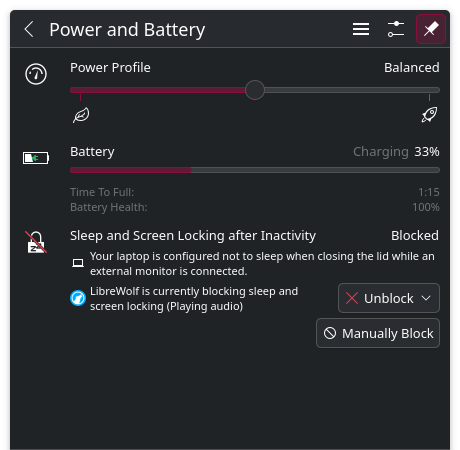
When I check my battery, it says “Librewolf is currently blocking sleep and screen locking (Playing audio)”. This happens even when there is no audio playing. What’s causing this, how do I fix it?
You must log in or # to comment.
Stupid question, is there still a librewolf process running? Have you tried killing it? Does that free up the system suspend state?
Yes, librewolf is running. I intentionally have it open. But there is no audio playing.
When I kill the process, it does not unblock, even though there is no librewolf process left.
When I reboot the computer and restart librewolf, it does not block.
When I play a video in the browser, it blocks again.
When I close that tab, it is still blocked.
When I close the browser, it is still blocked, even though there is no librewolf process left.
(This is the Flatpak version, if that helps)
Is it possible for you to try the appimage, or the binary built for you OS, like installing the rpm if using fedora?
If this happens there too, maybe there is some issue with your KDE. If it does not, check if the flatpak version has some addon which might be the reason.
In either case, you should file a bug report.
You can also try installing the plasma integration addon which can connect the browser and the KDE system, and see if this problem goes away.
There is no Librewolf system package for my OS (Debian)
There is.
https://librewolf.net/installation/debian/
There are 3 ways to install a native package. Third one being, downloading the .deb file and installing it.